
2027 Texas Conference on Digital Libraries
Commons Conference Center, Austin, Texas
10100 Burnet Road
Austin, TX 78758
Dates: May 25-27, 2027
Table of Contents
- Overview
- Venue & Session Accessibility
- Creating Accessible Presentation Files
- Giving Accessible Presentations
- Support Resources
- Questions
Overview
The Texas Conference on Digital Libraries (TCDL) strives to provide an accessible and welcoming conference experience. This page includes information about accessibility accommodations, venue and session accessibility, and guidance for creating and delivering accessible presentations.
Venue & Session Accessibility
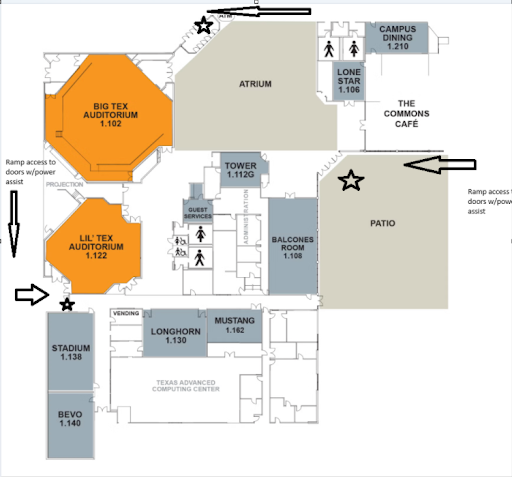
TCDL will be held at the Commons Conference Center. The conference center is ADA-compliant, with multiple entrances with ramps and power-assisted doors. (See diagram below, where arrows indicate ramps, and stars indicate power-assisted doors.)
Each parking lot contains ADA parking spaces.
Because the conference is held at The University of Texas at Austin (UT Austin), we follow UT Austin’s service animals policy.
If you need ASL interpretation or CART transcription, please note it on your registration form and contact info@tdl.org no later than two weeks before the conference. Services may not be available if not requested with advanced notice. For more information, see the UT Austin Disability & Access website.
Seating will be reserved in session rooms for wheelchair users and attendees who need to sit near presenters (for example, because of hearing loss or low vision). Reserved seats will be marked with paper signs.
The stage in Big Tex Auditorium is accessible via a ramp, however the stage in Lil’ Tex Auditorium requires stairs to access.
Two accessible single-stall, all-gender restrooms are available. A private lactation room is available for attendee use. Please visit the Guest Services desk to request access or obtain a key.
A quiet room will be available during designated times throughout the conference. Quiet room locations and times will be listed on the conference schedule.
Creating Accessible Presentation Files
All presentation materials must meet the accessibility requirements below to be included in the TCDL Conference Proceedings. Presenters are responsible for ensuring their files meet these requirements. Materials that do not meet accessibility guidelines may not be added to the TCDL Conference Proceedings.
- Use high-contrast colors, large fonts, and minimal text.
- Use built-in heading styles in software (PowerPoint, Google Slides, Word, etc.) to create a clear document structure.
- Use unique titles for each slide so people using screen readers can navigate the presentation more easily. When multiple slides cover the same topic, use titles such as “Accessibility Tips, 1 of 2.”
- Add descriptive alternative text to meaningful images, charts, and graphs. Refer to the W3C decision tree.
- Include visible descriptions or captions for meaningful images, charts, and graphs when they help explain information that may not be obvious from the visual alone.
- Use meaningful link text that describes the destination instead of generic phrases such as “click here.”
- Do not rely on color alone to convey meaning. Use text, shapes, patterns, or other visual indicators in addition to color.
- Use motion and animations only when they help explain content. Avoid blinking or flashing effects that may distract attendees or trigger seizures.
- Use PowerPoint’s Accessibility Checker to identify and correct issues such as reading order and missing alternative text.
Giving Accessible Presentations
In general, consider sight, hearing, cognitive and executive function, language barriers, and cultural differences when creating your presentation, as well as when presenting.
- Use microphones at all times if available.
- Introduce yourself before speaking to help attendees identify who is speaking.
- Use plain language, avoid jargon, and speak at a moderate pace.
- Repeat or summarize audience questions before answering them. Repeat questions into the microphone if needed.
- Describe visual content, charts, graphs, and audience responses aloud for attendees with visual impairments or those joining by audio only. For example, if you ask attendees to raise their hands, describe the response aloud.
- Provide an accessible version of your presentation and any handouts in advance when possible.
- Consider accessibility when using polls, sticky notes, group exercises, or other interactive activities.
- Pause between topics and allow extra time for questions and discussion.
- Make text, graphics, videos, posters, and other visual content large enough to be read from the back of the room.
- Face the audience as much as possible while speaking so attendees can see facial expressions and lip movements.
- Avoid wearing perfume, cologne, or other strongly scented products.
Support Resources
Much of the content on this page was informed by these resources. We encourage presenters to view them as additional sources for accessibility information.
- Digital Library Forum, “Creating Accessible Presentations”
- EDUCAUSE, “Accessibility Information for Presenters”
- TDL DSpace User Group, “Creating Accessible Files”
- W3C Web Accessibility Initiative, “Making Events Accessible”
Questions
For any questions regarding accessibility, please email info@tdl.org.