
The Texas Conference on Digital Libraries (TCDL) strives to be a conference that is accessible and welcoming to all. This page contains information about accessibility policies and practices at TCDL 2026, including venue and session accessibility and advice for speakers on creating and delivering accessible presentations.
If you have questions or need accommodations, please contact info@tdl.org.
Texas Conference on Digital Libraries
Tuesday, June 2 – Thursday, June 4, 2026
In Person: Commons Conference Center, Austin, Texas
Quick Navigation
- Venue & Session Accessibility
- Creating Accessible Presentation Files
- Giving Accessible Presentations
- Additional Resources
Venue & Session Accessibility
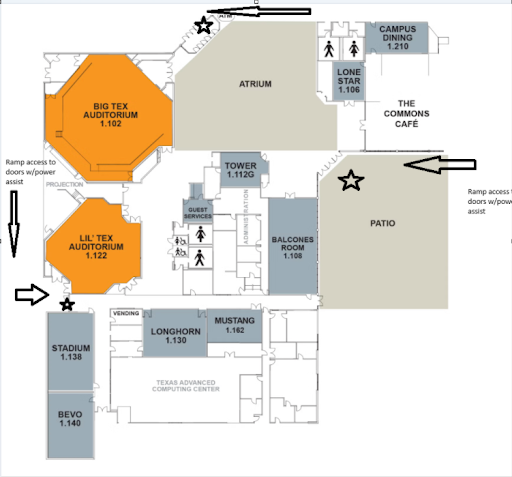
TCDL will be held at the Commons Conference Center. The conference center is ADA-compliant, with multiple entrances with ramps and power-assisted doors. (See diagram below, where arrows indicate ramps, and stars indicate power-assisted doors.) Each parking lot contains ADA parking spaces.
Because the conference is held at UT Austin, we follow UT Austin’s service animals policy.
If you need ASL interpretation or CART transcription, please note it on your registration form and contact info@tdl.org no later than two weeks before the conference. Services may not be available if not requested with advanced notice. For more information, see the UT Austin Disability & Access website.
Seating will be reserved in session rooms for wheelchair users and seats for those needing proximity to speakers (for example, because of hearing loss or low vision). Reserved seats will be marked with paper signs. Seating locations may vary based on room configurations; if you have particular needs, please note it on your registration form or speak to the check-in table at the conference.
The stage in Big Tex Auditorium is accessible via a ramp, however the stage in Lil’ Tex Auditorium requires stairs to access.
Two accessible single-stall, all-gender restrooms are available. A private lactation room is available for attendee use. Please visit the Guest Services desk to request access or obtain a key.
A quiet room will be available during designated times throughout the conference. Quiet room locations and times will be listed on the conference schedule.
Creating Accessible Presentation Files
All presentation materials will need to meet accessibility requirements for inclusion in the TCDL Proceedings. It is the responsibility of presenters to make sure your files meet the accessibility requirements below. Materials that do not meet accessibility guidelines may not be added to the TCDL Proceedings.
- Use high-contrast colors, large fonts, and minimal text.
- Use built-in heading styles in software (PowerPoint, Google Slides, Word, etc.) for proper structure.
- Slide titles: Use unique titles for each slide so people who use screen readers can more quickly navigate around the presentation file. Use ‘Slide Title 1 of 2’ (for example, ‘Accessibility Tips, 1 of 2’) when there are multiple slides with the same topic information.
- Alternative text: Ensure all meaningful images, charts, and graphs have descriptive alternative text for screen readers. Refer to WC3 decision tree.
- Captions: Ensure all meaningful images, charts, and graphs have descriptive captions for screen readers. In the rare case a video is used, ensure captioning (or a script if captioning is not possible) is available.
- Descriptive links: Avoid generic “click here” links. Use meaningful hyperlinked text that describes the destination.
- Using color: Avoid using color alone to convey meaning, as your message may be missed or misunderstood by individuals who can’t see color. Instead use color along with a secondary element (such as shape or pattern or text differences) to ensure the meaning can be understood without the use of color alone.
- Consider how to use motion or animations: This includes text or images flying in from the side. Will the motion make the information easier to understand or is it unnecessary? Certain types of motion can be particularly distracting for some people and can make some people ill. Avoid blinking or flashing that could cause seizures.
- Use PowerPoint accessibility wizard to identify and correct reading order, enter in alt text for images/charts, etc.
Giving Accessible Presentations
In general, consider sight, hearing, cognitive and executive function, language barriers, and cultural differences when creating your presentation, as well as when presenting.
- Use microphones at all times if available.
- Introduce yourself: Advise speakers to introduce themselves before speaking to help attendees with hearing loss.
- Speak clearly: Encourage speakers to use plain language, avoid jargon, and speak at a moderate pace.
- Repeat questions: Instruct speakers to repeat or summarize audience questions before answering them. Repeat audience questions into the mic, if needed.
- Verbal descriptions: Instruct presenters to verbally describe visual content, charts, and graphs for attendees with visual impairments or who are joining by audio only. Describe visual information in the environment. For example, a speaker asks people to raise their hands if they make their websites fully accessible. The speaker should then describe the visual response: “About half raised their hand”.
- Document accessibility: Provide an accessible version of the presentation and any handouts in advance. TCDL encourages presenters to upload slides and other materials to Sched in advance of your session.
- Consider activities: Remember potential accessibility issues with participant activities. For example, it may be difficult or impossible for some people to use an online polling feature, arrange sticky notes on a virtual or physical board, or respond quickly to questions.
- Give people time to process information: Pause between topics. When you ask if anyone has questions, some people with cognitive differences will need extra time to form their thoughts into words.
- Make text and important visuals big enough to be read even from the back of the room: This includes graphics on slides, videos, posters, and other non-electronic material.
- Minimize turning your back to your audience: Seeing your facial expressions helps to understand context and provides the opportunity for some in your audience to read your lips.
- Refrain from wearing perfume, cologne, or other strongly scented products.
Additional Resources
Much of the content on this page was informed by these resources. We encourage presenters to view them as additional sources for accessibility information.
- Digital Library Forum, “Creating Accessible Presentations”
- EDUCAUSE, “Accessibility Information for Presenters”
- TDL DSpace User Group, “Creating Accessible Files”
- W3C Web Accessibility Initiative, “Making Events Accessible”
For any questions regarding accessibility at TCDL 2026, please email info@tdl.org.